

µDash - Real-Time OBD / CAN Monitoring TDL
Universal OBD
R$ 990,00
Sale price
R$ 990,00
Regular price
Skip to product information


µDash - Real-Time OBD / CAN Monitoring TDL
R$ 990,00
Sale price
R$ 990,00
Regular price
1-year warranty
90-day statutory + 9-month contractual · see terms
BR Technical Support
Proprietary manufacturer engineering
Free shipping
Orders over R$ 2,000 (Brazil)
Ships in 7 to 15 business days
What is the µDash?
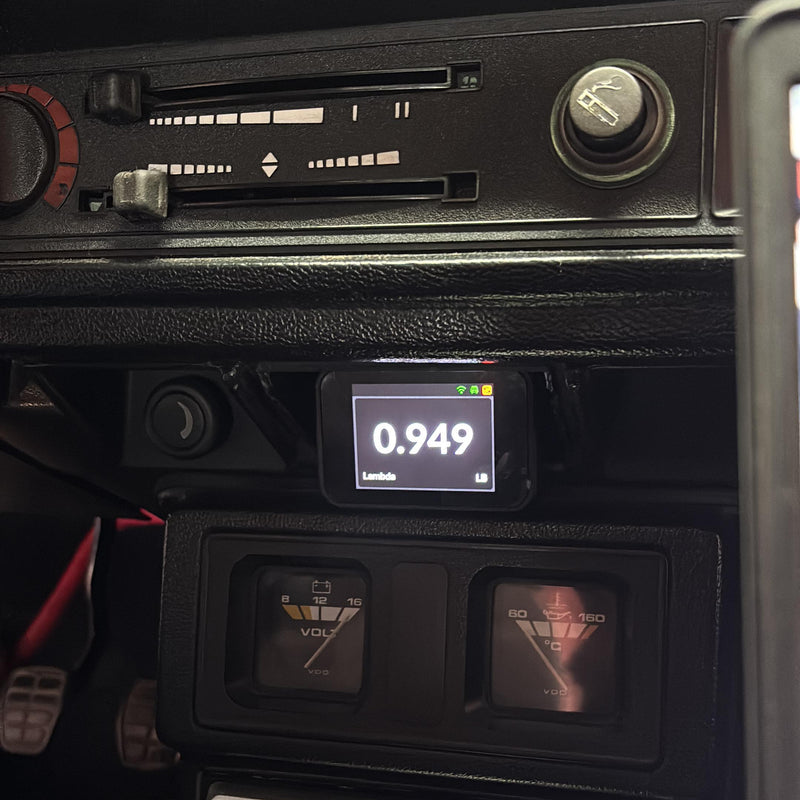
The µDash is Pro Tune's compact vehicle monitoring and telemetry system. Equipped with a 2.4" capacitive touchscreen, it displays real-time information such as RPM, speed, temperatures, pressures and other channels provided by the vehicle or the ECU.
After initial activation, the µDash can work standalone as a display, with no subscription and no need for a permanent internet connection. With an active subscription, it also logs sessions and automatically syncs the data to Pro Tune Performance Cloud. On compatible plans, RACE mode lets you follow live telemetry, with data arriving in as little as 100 ms.
Who it's for
Designed for enthusiasts, drivers, tuners, engineers, workshops and teams that need to follow vehicle data in a practical, straightforward way.
On the street, it offers a compact, easy-to-read display that takes up little space inside the vehicle. In racing applications, it lets you log sessions, analyze data in Performance Cloud and remotely monitor the vehicle during on-track activity.
It can also be used by workshops and tuners for monitoring, diagnosing and following up on their customers' vehicles.
Videos
µDash highlights
- Works as a display even without a subscription, after initial activation
- Automatic session logging on plans with an active subscription
- Local storage and automatic sync with Performance Cloud
- Live telemetry with data arriving in as little as 100 ms in RACE mode
- Automatic over-the-air firmware updates
- 2.4" capacitive touchscreen
- Channel configuration directly on the device
- Three display layouts
- Automatic channel detection in OBD-II applications
- 2.4 GHz Wi-Fi with up to four saved networks
- CAN communication up to 1 Mbit/s
- Internal CAN terminator, enabled via the interface
- 6 to 30 V power supply, compatible with 12 V and 24 V systems
- Compatible with different protocols, vehicles and programmable ECUs
- Continuously expanding compatibility through firmware updates
Main features
- Real-time display of data provided by the vehicle or the ECU
- 2.4" capacitive touchscreen with 800 nits brightness and 1000:1 contrast
- 320 × 240 pixel resolution and 16-bit color
- Compact design, weighing approximately 25 g
- Flush-mount finish for dash integration
- Three display layouts
- Channel selection directly on the screen
- Touch and gesture navigation
- Automatic re-detection of available channels in OBD-II applications
- Automatic or manual selection of the communication protocol
- CAN speed settings of 250 kbps, 500 kbps and 1 Mbps
- Automatic session logging on plans with an active subscription
- Local data storage when no connection is available
- Automatic sync with Pro Tune Performance Cloud
- Session history and graphical analysis
- Live telemetry in RACE mode
- 2.4 GHz Wi-Fi with up to four saved networks
- Setup AP for adding networks from your phone
- Configurable internal CAN terminator
- Automatic firmware updates with an active subscription
Technical specifications
General characteristics
| Part Number | 32892 |
|---|---|
| Dimensions | 76.70 × 51.86 × 25.22 mm (W × H × D) |
| Screen | 2.4" capacitive touchscreen |
| Brightness | 800 nits, adjustable |
| Contrast | 1000:1 |
| Weight | Approximately 25 g |
| Housing | Injection-molded ABS |
Electrical characteristics
| Connector | 8-pin JST: CAN Low, CAN High, positive power and GND. Four pins reserved and unused. |
|---|---|
| Power supply | 6 to 30 V, compatible with 12 V and 24 V vehicle systems |
| Power consumption | Less than 0.2 A in operation, with a 0.3 A peak |
Communication
| CAN bus | Up to 1 Mbit/s, with internal terminator enabled via the interface |
|---|---|
| CAN speeds | 250 kbps, 500 kbps and 1 Mbps |
| Compatibility | OBD, Pro Tune products and compatible programmable ECUs |
| Connectivity | 2.4 GHz Wi-Fi |
| Saved Wi-Fi networks | Up to 4 networks |
| Wi-Fi setup | Built-in Setup AP |
Features
| Screen layouts | 3 layouts available |
|---|---|
| Channel configuration | Directly on the touchscreen |
| Acquisition rate | Up to 200 readings per second, depending on the subscribed plan |
| Live telemetry | Data arriving in as little as 100 ms in RACE mode |
| Session logging | Automatic start and stop when the device is powered on and off |
| Firmware updates | Over the internet, with an active subscription |
Compatible software
Pro Tune Performance Cloud: the platform used to receive, store, view and analyze the sessions logged by the µDash.
Depending on the subscribed plan, it allows:
- Session history
- Viewing of logged channels
- Graphical analysis with the web Analyzer
- Configurable dashboards
- Automatic data sync
- Remote telemetry monitoring
- Device management
- Management of saved Wi-Fi networks
*Analyzer Basic is available on the Performance Cloud Street plan. The Performance, Track, Team and Category plans include Analyzer Standard.
Available configurations
- Choose from three screen layouts
- Selection of displayed channels directly on the touchscreen
- Brightness intensity adjustment
- RACE telemetry activation, depending on the subscribed plan
- Re-detection of available channels
- Communication protocol selection
- Automatic detection or manual setting of the CAN bus speed
- Enabling or disabling the internal CAN terminator
- Up to four saved 2.4 GHz Wi-Fi networks
- Management of saved networks via Performance Cloud
- Setup AP for adding a new network from your phone
- Configurable boot splash screen from the Performance plan up
- Factory reset
- Device recovery mode
- Automatic firmware updates with an active subscription
Shipping time
⏱ Ships within 7 to 15 business days after payment confirmation.
Frequently asked questions
Is the µDash the same as the TDL EVO Street?
No. The µDash is a compact product focused on monitoring vehicle data, logging sessions, syncing with Performance Cloud and remote telemetry.
The TDL EVO Street belongs to a different product line and has different hardware, installation and usage characteristics.
Does the µDash work without a subscription?
Yes. After initial activation, the µDash can be used without a subscription as a local real-time display.
Without an active subscription, session logging, data upload to Performance Cloud, history, firmware updates and remote telemetry are not available.
Do I need internet to use the µDash?
Not for operation as a local display.
Internet is required for:
- Initial activation
- Device registration
- Session sync
- Firmware updates
- Remote telemetry
- Data upload to Performance Cloud
With an active subscription, when there is no connection, the µDash keeps storing data locally and syncs when a saved network becomes available again.
What's the difference between SYNC and RACE modes?
In SYNC mode, the µDash logs sessions and uploads the data to Performance Cloud in batches. The upload interval varies according to the subscribed plan.
In RACE mode, data is streamed in real time during the session, enabling remote monitoring with information arriving in as little as 100 ms.
Which plans include RACE mode?
RACE mode is available on the following plans:
- Track
- Team
- Category
The Street and Performance plans use SYNC mode.
What happens when the vehicle loses Wi-Fi connection?
The device keeps working as a display.
With an active subscription, session data remains stored locally. When a saved Wi-Fi network becomes available again, the information is synced to Performance Cloud.
How many Wi-Fi networks can be saved?
Up to four 2.4 GHz Wi-Fi networks can be saved.
Networks are managed via Performance Cloud. You can also enable the Setup AP, which creates a temporary network for adding a new connection using your phone.
Does the µDash find hidden Wi-Fi networks?
No. Hidden networks are not currently supported.
Does the µDash work with an Android or iPhone hotspot?
Yes. On iPhone, the Maximize Compatibility option must be enabled.
The phone may put the hotspot to sleep when no other device is connected. During setup, keep the internet sharing screen open until the connection is complete.
Do updates need to be installed manually?
No. With an active subscription and a stable internet connection, the µDash downloads and installs firmware updates automatically, with no computer or manual installation required.
Can I change the information shown on the screen?
Yes. Channels can be changed directly on the touchscreen, without needing a computer or phone.
Channel availability depends on the data transmitted by the vehicle or the ECU and on the limits of the subscribed plan.
How many screen layouts are available?
The µDash has three screen layouts available on all plans, including when used without a subscription.
Is the µDash compatible with OBD-II?
Yes. When it identifies an OBD-II application, the µDash queries the data returned by the ECU and automatically catalogs the available channels.
This detection can be rerun on the device itself whenever needed.
Does the µDash work with programmable ECUs?
Yes. The µDash is compatible with various programmable ECUs and CAN protocols.
Compatibility depends on the ECU model, the protocol used, the equipment version and the channels transmitted. Check the official list of compatible protocols and applications before installation.
Does the µDash have GPS?
The µDash does not have built-in GPS.
It can receive geolocation data transmitted by compatible dashes, such as certain Pro Tune or MoTeC units, and use that information in Performance Cloud.
Can I use the µDash alongside other TDLs?
Yes, it works with the Dash EVO 5", Dash EVO 7" and EVO Street over the CAN bus.
Installation must follow the corresponding wiring diagram. For other TDL models, compatibility and CAN bus topology must be confirmed.
Can I use it with Bosch lambda sensors?
The µDash does not directly read the signal from any Bosch lambda sensor simply because it is a Bosch sensor.
Reading depends on a compatible ECU or controller that provides the lambda value over a supported protocol. Compatibility with the Bosch MS4, for example, does not mean automatic compatibility with all Bosch sensors and controllers.
What is the CAN terminator?
It is an internal resistor, typically around 120 ohms, used to terminate the CAN bus.
On the µDash, it can be enabled or disabled via the interface. Enabling it can help in cases of communication failure, especially on 1 Mbit/s networks, but the correct setting depends on the vehicle's network topology.


